In this article
A deadline in an email is not proof of a debt
An email arrives warning that your website will disappear unless you pay today. It has a logo, a reference number and a button that says “Renew now”. You are busy, the amount seems plausible and losing the website sounds inconvenient. That is exactly the moment to pause and check.
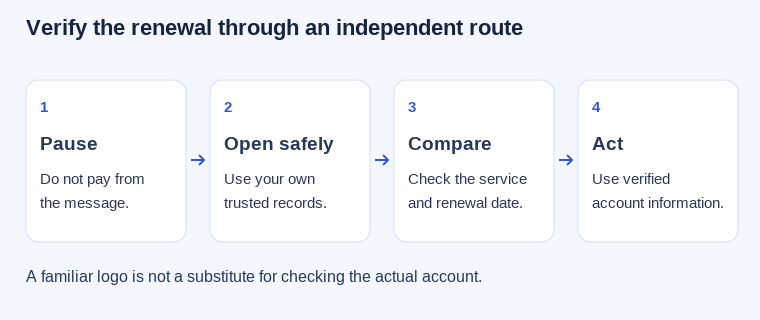
Some renewal reminders are genuine. Others may be misleading sales offers or attempts to obtain money or account details. You do not need to decide which by studying the logo. Verify the underlying service through a route you already trust, rather than letting the message choose the route for you.
Work out what is supposedly being renewed
“Your website” can refer to several different things. The domain name, hosting, email service and optional tools may have separate providers and renewal dates. A message that blurs those together is not giving you enough information to make a payment decision.
Compare the claimed service with your own account and renewal records. Do you use that provider? Does the named domain belong to your business? Is the date consistent with the official account? A familiar business name or website address in the message is not proof that the sender is entitled to collect payment.
Use an independent route to the real account
Open the provider’s website using a saved bookmark or the official address from your own records. Do not follow the renewal email’s link to check whether the email is genuine. Once signed in through the trusted route, look for the actual service, renewal date, price and any account notifications.
If a supplier manages the service for you, contact them through a number or address you already know. Do not use the contact details supplied only in the suspicious message. A genuine deadline can still be dealt with after this check; you are verifying the instruction, not ignoring the business responsibility.
Treat warning signs as clues, not a complete test
Pressure, unusual payment instructions, an unexpected attachment or a request for login details should make you cautious. An unfamiliar sender address or a mismatched destination can also be a warning. However, tidy spelling and a convincing logo do not make a message safe.
Avoid trying to settle the question from appearance alone. Messages can copy branding and contain accurate public details. Your own service record and a verified account are more useful than a checklist of cosmetic signs. If you cannot establish what the charge is for, ask for clarification through a trusted contact before paying.
Use a short verification note
Keep this note alongside your renewal record. It helps turn a worrying message into a small set of checks, and it is especially useful if more than one person handles payments. Do not copy passwords, payment-card details or recovery codes into it.
If the message is simply an offer for an extra service, treat it as a purchasing decision rather than an overdue bill. A renewal-looking layout does not mean you have agreed to buy what is being offered. Check what your business already has before adding another subscription or listing.
Renewal verification note
Message received: [date]
Service claimed: [domain / hosting / email / other]
Provider in our records: [name]
Trusted route used to check: [bookmark / known account / known supplier]
Actual account renewal date and status: [details]
Does the request match? [yes / no / unclear]
Next action: [pay through verified account / ask trusted supplier / report and discard]
If you have already clicked or paid
Do not spend time blaming yourself. If you entered account credentials, use the provider’s trusted website to secure the account and follow its recovery advice. If you supplied payment details or sent money, contact your bank promptly through a known official route and explain what happened.
Follow the current official guidance for reporting suspicious emails and websites, and keep relevant evidence without reopening risky attachments. Then improve the record that would make the next check easier: which services you use, who manages them and where to verify renewals. A clear record is far more useful than trying to memorise every possible scam.
YOUR NEXT ACTION
One useful thing to do
Check renewal requests inside the provider account you reach through your own trusted records.
Further reading
Original guidance for the topics mentioned above. Check the current guidance when making decisions for your business.
Prepared with AI assistance for My Next Action. Examples and illustrations are explanatory; they do not represent customer projects or testimonials.