
In this article
Start with the customer, not the welcome message
Someone has recommended you. Your potential customer opens your website while waiting for the kettle, with a job in mind and several things still uncertain. Can you do it? Do you work near them? Will getting in touch be straightforward? That is a useful starting point for your homepage.
A large “Welcome to our website” answers none of those questions. Neither does a photograph of a handshake. You have limited attention to work with, so spend it on information that helps someone decide whether to take the next step. You can be friendly and specific at the same time.
1 and 2: What do you do, and who is it for?
Write one sentence that names the work and the kind of customer you help. “Fitted wardrobes and storage for homes in Sheffield” gives people more to go on than “Turning your dreams into reality”. It also helps you recognise enquiries that are outside your scope.
You do not need to squeeze every service into the headline. Pick the main thing, then use a short list underneath for related work. If you mostly fit kitchens but sometimes repair doors, give kitchens the prominent place. A homepage is an introduction, not your entire working history.
3 and 4: Where do you work, and what can I see?
Name your main working area in ordinary language. A visitor should not have to decode an unfamiliar postcode or find a small address in the footer. If you travel further for certain projects, explain that separately rather than claiming an enormous area just in case.
Then show something that supports what you say: a genuine project photograph with a useful caption, a brief account of a completed job, or an authentic review you have permission to reproduce. A photo labelled “Alcove cupboards, fitted around an existing socket” says more than “Our quality work”. If your business is new, be honest about that; useful service information is better than invented evidence.
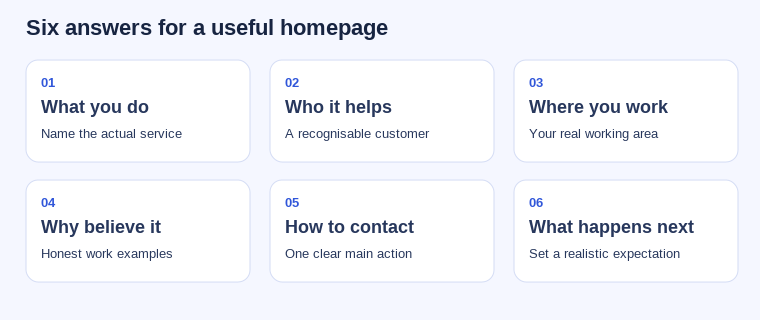
5 and 6: How do I contact you, and what happens next?
Choose one main action: call, send an enquiry, or request a visit. Other contact methods can still be available, but a row of competing buttons makes a simple decision feel more complicated. Use a label that describes the action, such as “Ask about your project”, rather than a vague “Discover more”.
Explain what the customer should include and what you will do with it. “Tell me what needs doing and your area; I’ll get back to you to discuss the job” is useful. Only promise a particular response time if you can keep it. Make clear whether submitting a form is an enquiry or an actual booking.
Write your six-line homepage brief
Before choosing colours or moving boxes around, fill in this short brief. Use the words you would use with a customer. Leave out anything you cannot back up, and replace the bracketed parts rather than publishing them as they stand.
Give the finished version to somebody who does not already know your business. Ask them what work you do, where you do it, and how they would contact you. If they hesitate, improve the wording first. A different font cannot rescue a missing answer.
Six-line homepage brief
I help [type of customer] with [main service].
My main work includes [two or three concrete jobs].
I work in [core areas], with [any sensible travel condition].
You can see [genuine projects or other honest evidence].
The best way to contact me is [method].
After you enquire, I will [real next step].
Keep the useful details close together
Once the essentials are clear, add the details that genuinely help: opening hours, relevant qualifications, access requirements or a short explanation of your process. There is no prize for making somebody scroll past a life story before finding your phone number.
Check the result on a phone as well as a laptop. Read the headline, locate the service area and try the contact action. Your first improvement does not have to be a redesign. It might be one clearer sentence and a working button, which is a perfectly respectable afternoon’s progress.
YOUR NEXT ACTION
One useful thing to do
Write the six-line brief before spending time on the appearance of your homepage.
Prepared with AI assistance for My Next Action. Examples and illustrations are explanatory; they do not represent customer projects or testimonials.