In this article
A good-looking page is only the start
You can look at your homepage every day and still miss a broken contact route. The phone number may be visible but the button may dial an old one. A form may display a friendly success message while its emails land somewhere nobody checks. These are small gaps with very practical consequences.
Set aside a few minutes for a realistic contact check. The clicking can be quick, although message delivery may take longer. Use the live website as a customer would, preferably on a phone that is not already open in your usual editing account. Keep a short note of what you test and what needs fixing.
Check the actual destination behind each button
Tap the telephone link and inspect the number your phone offers to call. You can cancel before placing the call if you only need to check the destination. Compare it with the number printed on the page. A neat label can hide a different value underneath.
Try the email link in the same way. Confirm the destination address and any pre-filled subject. If it opens an email app you do not use, that is not automatically a website fault; people have different device settings. Keep the address available as readable text so a customer can copy it when needed.
Send a realistic test message
Fill in the form with a clearly labelled test enquiry. Use a reply address you can access, enter a normal amount of text and try any optional field customers are likely to use. Do not include real customer information in a routine test.
Check the field labels, instructions and error messages as you go. If you leave out a required field, does the page explain what to fix? Does it retain the rest of your message? After a valid submission, read the confirmation carefully. It should describe what actually happened and the next step without implying that an enquiry is a confirmed booking.
Safe test enquiry
TEST ENQUIRY — no booking required.
I’m checking the website contact form on [date]. Please confirm this reached the expected inbox.
Reference: [a short unique label you can search for].
Reply address: [an address you control].
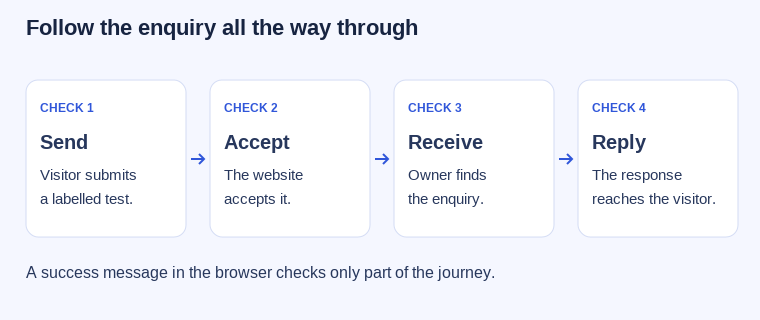
Follow the message all the way through
Check the intended inbox and any relevant spam or filtering area. Confirm that the message contains the details you entered and that the subject helps you recognise it. If the system also stores enquiries in a dashboard, check that record rather than assuming email is the only evidence.
Reply to the test and verify that the response reaches your test address. Some setups display the sender’s details but use a different reply destination. This final step catches a problem you would miss by simply noting that the first email arrived.
Check the extra routes without creating real appointments
If the site links to WhatsApp, confirm that it opens the correct conversation or draft. If it links to booking software, check that the correct service and business appear. Avoid completing a real paid booking just to test a button; use the provider’s appropriate test process or agree a safe check with the person managing it.
Make sure every route matches the wording on the page. “Request a visit” is different from “Book a confirmed appointment”. A map, social link or old contact page can also send someone to outdated information, so include any prominent alternative route in your check.
Record the result and give faults a next step
Note the date, device, routes checked and whether each one worked. If something fails, capture the visible error and the time it happened, without sharing passwords or sensitive information. Send the useful details to whoever maintains the site.
Until the fault is fixed, provide a clear working alternative where practical. Then repeat the failed part after the repair. This small habit is especially worthwhile after changing an email address, updating a form or moving services. A website has done its contact job only when a customer can reach you and you can continue the conversation.
YOUR NEXT ACTION
One useful thing to do
Submit one labelled test enquiry, verify its arrival and check that your reply reaches the test address.
Further reading
Original guidance for the topics mentioned above. Check the current guidance when making decisions for your business.
Prepared with AI assistance for My Next Action. Examples and illustrations are explanatory; they do not represent customer projects or testimonials.