
In this article
Start with how the work is agreed
“Can customers book online?” sounds like a simple website question. The answer depends on what booking means in your business. Reserving a fixed-length appointment is different from asking you to inspect a roof, discuss fitted furniture or work out what is causing a leak.
Before choosing software, write down what has to happen between an enquiry and a confirmed job. If you need measurements, photographs, a conversation or a site visit before committing, a calendar alone cannot make those decisions. The website should support your process, not encourage customers to make assumptions your working day cannot accommodate.
Separate an enquiry, a booking link and a booking system
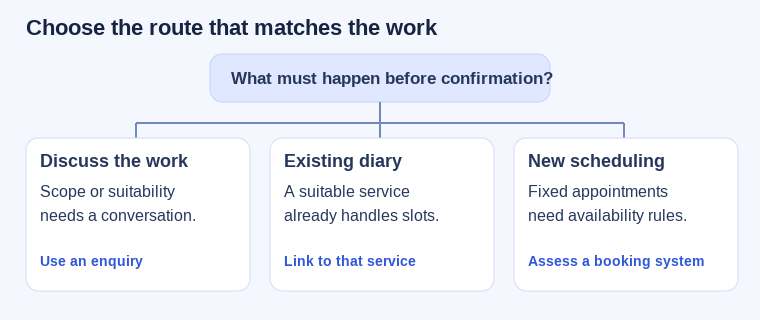
An enquiry form collects information so you can decide the next step. A booking link sends someone to an existing service where appointments may be managed. A booking system handles the actual rules around available times, services and confirmations. Those are different jobs, even if all three start with a button.
If you already use a suitable booking service, linking to it may be enough. Check where the link goes and whether it opens the right business and appointment type. Do not describe a simple link as a new booking platform included in the website; the external service still has its own account, settings and costs.
When a straightforward enquiry is a better fit
An enquiry route makes sense when scope, access or suitability needs discussion before a date is agreed. Ask for the few details that help you respond and make clear that submitting the form does not reserve time in your diary.
You can still make this feel efficient. Explain what to send, provide a clear confirmation and organise the follow-up at your end. A short, reliable form is not a poor relation of online booking. For work that varies from job to job, it may be the more honest and useful first step.
When a booking system earns its place
A booking system is worth considering when the service has a defined duration, clear availability and rules you can express accurately. Think about travel, preparation, breaks, the number of people or resources needed, and what happens if one appointment runs over.
You will also need to manage changes, cancellations and customer messages. If the diary is not kept current, the system may offer a slot you cannot honour. Ask who will maintain the settings and whether the tool works comfortably on a phone. A calendar is useful when it reflects your real availability, not merely because it looks convenient on a demo.
Treat payments and deposits as another decision
Taking a payment introduces a separate set of arrangements: the payment provider, fees, confirmations, refunds and the information a customer receives before paying. Do not assume a booking feature includes all of this or that accepting money automatically settles every detail of the job.
Discuss the exact requirements with the supplier and use the relevant professional guidance for your business where needed. For an initial website, it may be enough to arrange the work first and handle payment through your existing process. Add an online payment step because it solves a clear problem, rather than because the button is available.
Use this brief before choosing a feature
Fill in the short brief below. If you cannot describe the service duration or availability rules yet, that is useful information. It may mean you should improve the enquiry process first and return to scheduling later.
Once the route is chosen, label the button accurately. “Ask about your job”, “Request a survey” and “Book a 30-minute appointment” create different expectations. Test the complete journey, including confirmation and what you receive at your end. A simple route that matches the work is much more valuable than a sophisticated one that promises the wrong thing.
Booking decision brief
The customer wants to arrange: [service]
Before confirming, I need: [information or inspection]
The duration is: [fixed / variable]
Availability is maintained by: [person and tool]
The first action should be: [enquiry / existing booking link / new scheduling system]
Payment at this stage: [none / separately agreed requirement]
The button will say: [an accurate action]
YOUR NEXT ACTION
One useful thing to do
Write down what must happen before a job is confirmed, then choose the contact feature that supports it.
Prepared with AI assistance for My Next Action. Examples and illustrations are explanatory; they do not represent customer projects or testimonials.